Funding Your Account: Deposit, Convert, and Transfer to the Funding Wallet in 3 Steps
After completing KYC, you need to transfer funds into Bitfinex and move them to the Funding wallet before you can lend. This article covers the full process: depositing USDT, converting to USD, and transferring to the Funding wallet.

After completing KYC identity verification, the next step is to transfer funds into Bitfinex and move them into the Funding wallet to start lending. Bitfinex's lending feature only reads the balance in the Funding wallet — funds sitting in other wallets cannot be lent out. This article walks through the full process of transferring USDT into Bitfinex, converting it to USD, and transferring it into the Funding wallet.
Deposit: Transfer USDT into Bitfinex
If you already hold USDT on another exchange or wallet, you can transfer it directly to Bitfinex. Below are the key points to watch for during the transfer.
Before you transfer: choosing the wrong network means losing your funds
Irreversible warning
Crypto transfers rely on blockchain networks to move funds. Bitfinex currently supports the following networks for USDT deposits: TRC-20 (Tron), ERC-20 (Ethereum), and Solana.
The network selected on the sending side must exactly match the network selected on the Bitfinex receiving side. If one side selects TRC-20 and the other selects ERC-20, the funds will be sent to an invalid address and cannot be recovered — support cannot intervene.
Mandatory: test with a small amount (5–10 USDT) first, confirm it arrives with the correct amount, then transfer larger sums.
Step 1: Get Bitfinex's USDT deposit address
Log in to Bitfinex, find Deposit in the top navigation bar, select USDT as the currency, then choose a network (TRC-20 / ERC-20 / Solana). Once selected, the screen will display the deposit address and QR code.
Step 2: Select the same network on the sending side and submit
Go to the withdrawal page of the exchange or wallet where you hold USDT, select USDT as the currency, and make sure the network field matches exactly the one chosen in Step 1. Then paste in the Bitfinex deposit address and submit. Always copy and paste the address — never type it manually.
Step 3: Wait for deposit confirmation
Crypto transfers require blockchain confirmation. TRC-20 usually takes under 5 minutes, ERC-20 takes anywhere from a few minutes to tens of minutes depending on network conditions, and Solana typically takes a few seconds to a few minutes. Once confirmed, the funds will first land in Bitfinex's Exchange wallet — this is normal; you'll transfer them in the next step.
Fee reference (source: autolend.io/posts/bitfinex-2026; actual fees are determined by the exchange at the time of transfer)
| Network | Approximate fee | Notes |
|---|---|---|
| TRC-20 | ~1 USDT | Common choice for small transfers |
| ERC-20 | ~1 USDT | Fee fluctuates with Ethereum network conditions |
| Solana | ~0.3 USDT | Low fee, fast confirmation |
Converting USDT to USD (only needed if you want to lend USD)
Bitfinex has two separate lending pools: USDT lending and USD lending. Deposited USDT stays as USDT — to enter the USD lending pool, you first need to convert it on the trading page. If you plan to lend only USDT, you can skip this section and go straight to the next one.
Step 4: Go to the USDT/USD trading pair
Search for USDT/USD on the Bitfinex trading page and open the order interface for this pair.
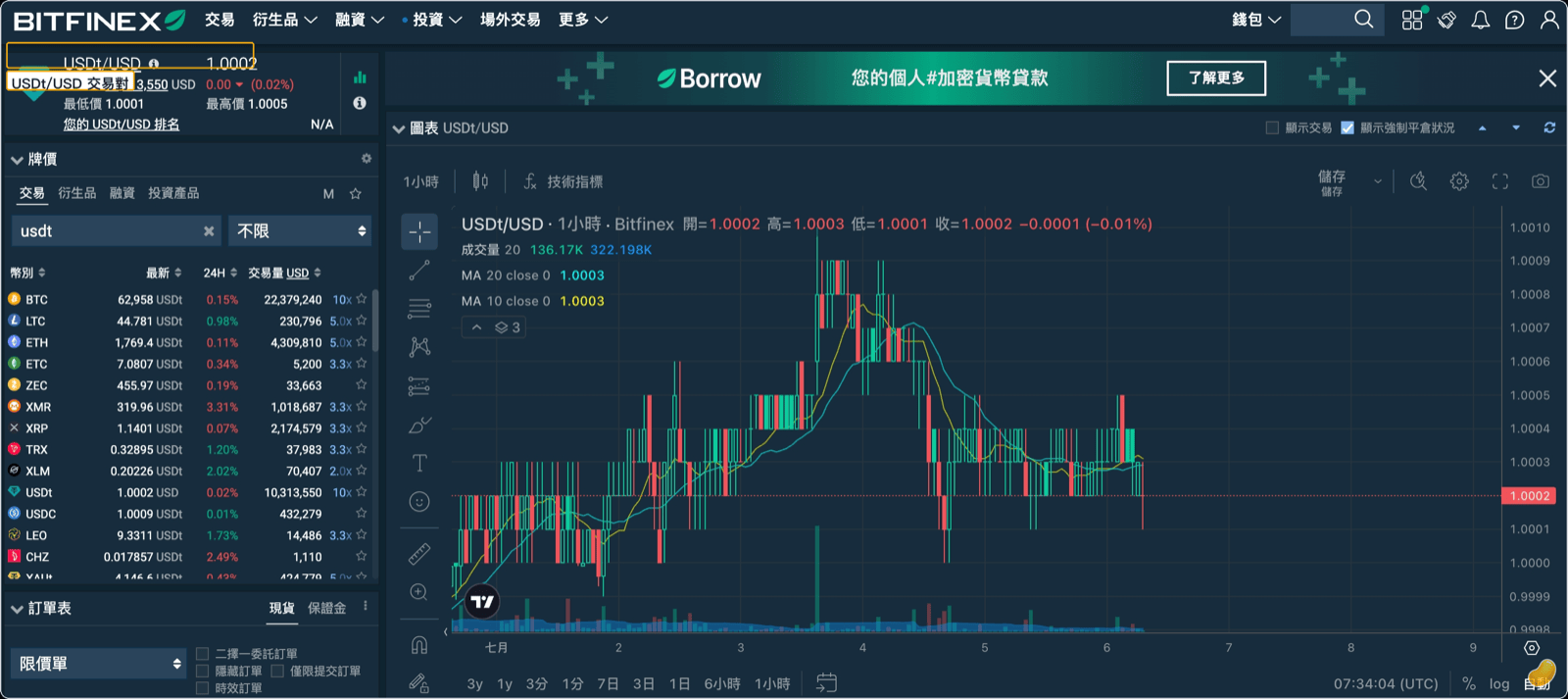
Step 5: Place a limit order
Select Sell USDT as the order direction, choose Limit as the order type, set a price close to the current market rate (e.g., 0.9998 or 0.9999), enter the amount, and submit. Limit orders are Maker orders, which carry lower fees than instantly matched Taker orders. Once filled, the USD will land in the Exchange wallet.
(Image: pending — USDT/USD limit sell order interface, showing order type / price / amount fields)
If the order doesn't fill after a while, you can adjust the price slightly closer to the market rate.
Transferring to the Funding Wallet
Step 6: Understand the three wallets
Assets on a Bitfinex account are held across three wallets:
- Exchange wallet: Used for spot trading; deposits usually land here first.
- Margin: Used for margin trading.
- Funding: Used for earning interest through lending — lending funds must be here, or lending won't be possible.
(Image: pending — Bitfinex wallet overview page, showing Exchange / Margin / Funding columns)
Step 7: Execute the transfer
On the Wallets page, click Transfer, select Exchange as the source, Funding as the destination, choose USD (or USDT, depending on which lending pool you're targeting) as the currency, enter the amount, and confirm.
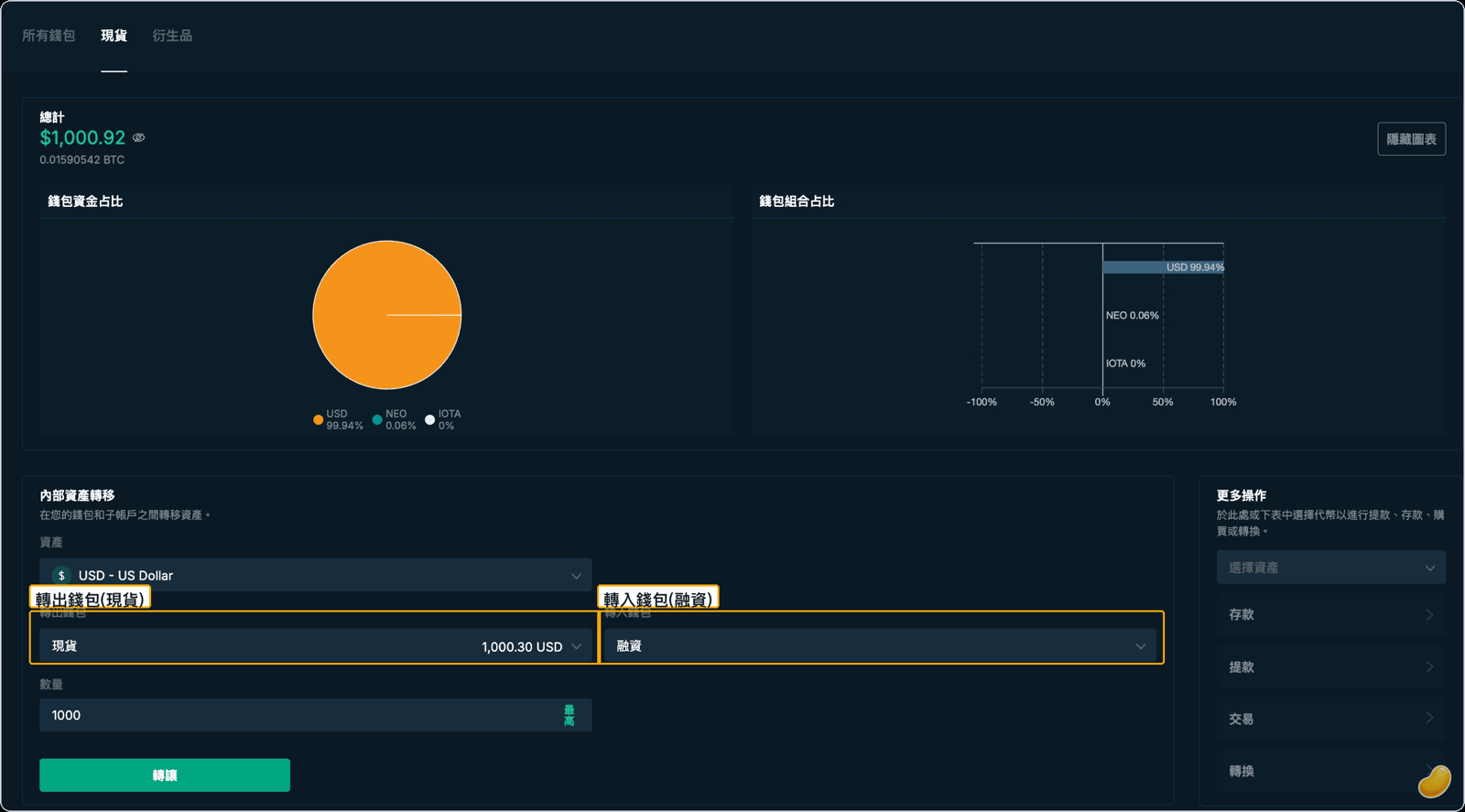
The most common mistake: forgetting to transfer after depositing, then going straight to the lending feature and finding no available balance. If funds aren't in the Funding wallet, lending isn't possible.
Step 8: Confirm the Funding wallet balance
After transferring, check the Funding wallet to confirm the USD balance has arrived. Bitfinex has a minimum lending amount (approximately 150 USD; the actual threshold follows the platform's rules at the time of operation) — confirm the balance meets this before proceeding.
(Image: pending — Funding wallet showing available USD balance (≥ 150 USD))
Appendix: Withdrawal Whitelist and the 5-Day Cooldown
If you plan to withdraw funds from Bitfinex in the future, the withdrawal whitelist feature lets you restrict withdrawals to specific addresses only. Note: setting up or modifying the whitelist triggers a 5-day withdrawal lock (source: rayskyinvest.com). It's recommended to set up the whitelist before depositing, so the cooldown period runs concurrently with the deposit process — avoiding a situation where you discover your account is locked right when you need to withdraw.
Quick FAQ
| Issue | Cause | Solution |
|---|---|---|
| Funds transferred but not showing on Bitfinex | Waiting on block confirmation | Wait 5–30 minutes and check again; TRC-20 is faster |
| USDT visible but can't find USD lending option | USDT hasn't been converted to USD yet | Complete Steps 4–5 in the conversion section |
| Funding wallet is empty | Exchange wallet funds haven't been transferred | Complete Step 7 in the transfer section |
| Lending page shows 0 available balance after transfer | Amount below the minimum lending threshold (~150 USD) | Deposit more or wait to accumulate funds |
| Discovered withdrawals are locked for 5 days when trying to withdraw | Whitelist was just set up | Wait for the 5-day cooldown to end |
Disclaimer: This article is for informational purposes only and does not constitute investment, financial, or tax advice, nor a solicitation. Cryptocurrency and lending involve risk; returns fluctuate and are not guaranteed, and principal may be lost. Lending rates are determined by market supply and demand; past performance does not indicate future results. Please assess your own risk tolerance and consult a professional for tax matters.